Did you ever think about your website’s carbon footprint? Not many people think about pollution when they browse the internet.
The statistical data shows that one website produces around 1.76kg of carbon dioxide (CO2) per view per page. To put that into perspective – a website that has 100,000 page views per month produces 2,112kg of CO2 in a year, and there are more than 1.92 billion websites in the world.
You don’t have to be a math genius to conclude that websites have a massive carbon footprint.
Luckily, there are some things you can do to optimize your website for sustainability and do your part in saving the planet.
- Go for green web hosting
- Reduce your website’s loading time
- Go for a mobile-friendly approach
- Improve your SEO
- Choose an energy-efficient programming language
- Make a print-friendly content
1. Go for green web hosting
The majority of all content on the internet is stored in data centers. These data centers are massive facilities with servers that can endure anything, from small BPO agencies, and big corporate websites to personal blogs.
The carbon footprint of these facilities is huge as all the servers must be kept in a cool, controlled environment. Such maintenance conditions require an extensive amount of energy.
Green web hosting refers to eco-friendly companies that provide a hosting service by using renewable energy sources. Their goal is to produce the same or a greater amount of energy than they consume and return it to the grid.
There are many already established green web hosting companies, but here we will concentrate on the top three:
1. Green Geeks
Green Geeks is the leading eco-friendly hosting company that runs on renewable energy only, and it hosts over 600,000 websites in 150 countries. They return three times the power they consume into the grid. Their services include:
- WordPress hosting – starting price $2.95 per month
- WooCommerce hosting – starting price $2.95 per month
- Reseller web hosting – starting price $29.95 per month
- Virtual private service – starting price $39.95 per month
2. Kualo
Kualo is another green hosting company completely powered by renewable energy. They host over 100,000 websites in 90 countries. Their services include:
- Shared hosting – starting price $5.99 per month
- Business hosting – starting price $13.33 per month
- WordPress hosting – starting price $5.99 per month
- Reseller hosting – starting price $19.99 per month
3. DreamHost
DreamHost is an eco-friendly hosting company that partners with renewable energy companies and uses reclaimed water for its cooling systems. Even though they are considered to be less “green” than the other two, it hosts more websites – more than 1.5 million of them.
They owe their popularity to providing a wider range of hosting services and affordable prices:
- WordPress hosting – starting price $1.99 per month
- Website hosting – starting price $1.99 per month
- Virtual private services – starting price $10 per month
- WP website builder – starting price $1.99
- Dedicated hosting – starting price $169 per month
- Cloud hosting – starting price $0.0075 per hour
Choose the green hosting company that best suits your needs. If you already have a hosting package, bear in mind that switching to green hosting is relatively easy and, in some cases, even free of charge.
The size of your website’s carbon footprint is also determined by your website design and functionality. You can use the Website Carbon Calculator to see just how much pollution your website produces.
If you are not satisfied with the results, here is what you can do to optimize your website design and functionality for more sustainability:
2. Reduce your website’s loading time
The longer your website takes to load, the higher the energy consumption it generates. To reduce your website’s loading time, try doing the following:
Optimize images and video files
Consider implementing lazy loading into your website for both images and videos. It helps reduce your website’s loading time as all images and videos are only loaded as the visitor scrolls down.
You can also compress your images and videos to reduce their size, thus shedding a significant “weight” on your website.
The ultimate goal is to use only videos and images that either help your visitors or add some value to your content.


Use simple design
When it comes to designing your website for sustainability, the “less is more” approach works best and is widely used by the top design companies.
Try not to overload your website with a complex layout, unnecessary images, videos, or pop-ups.
Making your website clean and concise will not only result in lowering your carbon footprint but provide a better user experience too.
Enable browser caching
Every time a browser loads your webpage, it has to download each of your web files (HTML, CSS, JavaScript, and images) to display your page properly.
The more requests your server receives at the same time, the more work it will have to do. This will result in more energy consumption and slow loading speed. This is where browser caching comes in place.
Browser caching helps by storing some of these files in the users’ browser, so when they revisit your website, they already have some of the files that would otherwise need downloading.
This results in fewer data needed for downloading and fewer requests sent to your server.
Choose fonts carefully
Believe it or not, fonts can add a significant file “weight” to your website. One font file could weigh up to 250kb and making it bold will add another 250kb.
Use common fonts such as Arial or Times New Roman. These fonts are already on the users’ devices, so they won’t require any additional loading files.
Minimize time to first byte (TTFB)
TTFB refers to the amount of time a browser spends before obtaining its first byte from the server. A slow TTFB can be caused by network issues, dynamic content, server configuration, etc.
Here is what you can do to reduce your TTFB response time:
- Reduce queries
- Keep your plugins and themes updated
- Optimize your database
You can also try using a Content Distribution Network (CDN) that will scatter copies of your website’s data across a worldwide delivery network. This will allow users from different countries to access your website faster.
Cutting down just a single kilobyte from the file that is loaded on 2 million websites reduces CO2 by approximately 2,950kg per month.
3. Go for a mobile-friendly approach
A mobile-friendly approach is very important for reducing your carbon footprint as more than 90% of the global internet population is using mobile devices for browsing.
Try putting only the essential content and transactions that will allow your users to load a minimum number of pages, thus consuming less energy in the process.
Use the Accelerated Mobile Pages (AMP) framework. By using a framework based on pre-existing HTML for streamlining the exchange of information with the browser, AMPs make the page’s loading speed almost instantaneous.
4. Improve your SEO
One Google search emits up to seven grams of CO2. Besides your website ranking, SEO optimization can also be very beneficial for eco-friendliness, as it helps the users find your site faster and respond to their needs quicker.
Both mobile-friendly approach and page loading time are SEO ranking factors, but there is more you can do for SEO optimization.
- Strategize for keywords
- Implement user-first approach
- Optimize your title tag and meta description
- Include internal links
5. Choose an energy-efficient programming language
In October 2017, a team of researchers released a study titled: “Energy Efficiency Across Programming Languages”. They have included 27 well-known programming languages in their research, and here is what they’ve discovered.

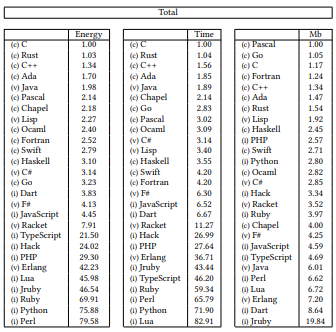
As you can see, there is a big difference in energy consumption in the top five and the bottom five programming languages.
6. Make a print-friendly content
Sometimes when printing a hard copy, you can experience certain difficulties – improperly displayed graphics, text missing from the paper, columns can be too narrow or too wide, etc.
This all leads to wasting more energy and resources. To make your website’s content more print-friendly, try doing the following:
- Remove unnecessary sections from your Cascading Style Sheets (CSS) – navigation menu, header, footer, sidebar, etc.
- Use printer-friendly styling – dark text on a white background, text size of 12pt or higher, easier-to-read fonts, etc.
Making your content print-friendly is that extra mile in becoming “green,” but your users who want to print something from your web page will appreciate the effort.
Conclusion
Optimizing your website for sustainability might seem challenging at times, but it is well worth the effort. Every little thing we do to help save our environment counts.
It’s only a matter of time before sustainable websites become mandatory practice. Making your website eco-friendly early in the game might just give you that competitive edge in the future.
We hope we’ve shown you why a “green” approach is the best approach for your website and helped you decide to get involved in saving the planet.